
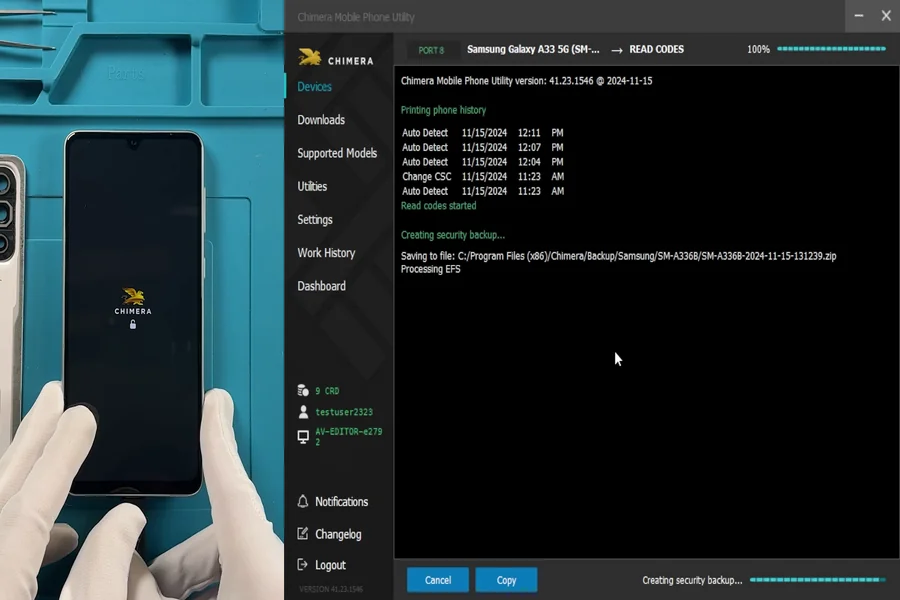
Unlocking Samsung devices requires accurate and secure access to essential information, and technicians need a reliable way to retrieve the codes that make this process possible. ChimeraTool’s Read Codes Online feature provides a clear and efficient method to read codes directly from compatible Samsung models, helping professionals complete network or region unlocking with confidence.
Overview of Read Codes Online
The Read Codes Online feature enables technicians to read codes such as MCK and NCK directly from Samsung devices, providing a fast and consistent method for unlocking.
These codes are retrieved through an online procedure that is fully integrated into Chimera’s interface, allowing users to complete essential tasks without switching tools or relying on external services. By keeping every step within one consistent interface, technicians can work with fewer mistakes and move through the network and region.
Since the process is built directly into the software, technicians can focus on the task at hand rather than dealing with additional equipment or complex bypasses. It appears alongside other ChimeraTool features, making it easy to learn and even easier to integrate into daily operations.
Why Reading Codes Matters
MCK and NCK codes play a central role in network and region unlocking, and the ability to read codes directly from the device gives technicians full control over the process. Instead of relying on partial information or external tools, professionals can access the exact data they need to proceed safely.
Unified and Safe Workflow
All steps take place inside one interface, therefore, technicians can maintain a predictable and secure environment while they read codes. There is no need for flashing, workaround scripts, or uncertain bypass methods. Everything is handled through a consistent workflow that reinforces reliability while reducing the number of variables that could lead to errors.
Supported Samsung Models and Connection Modes
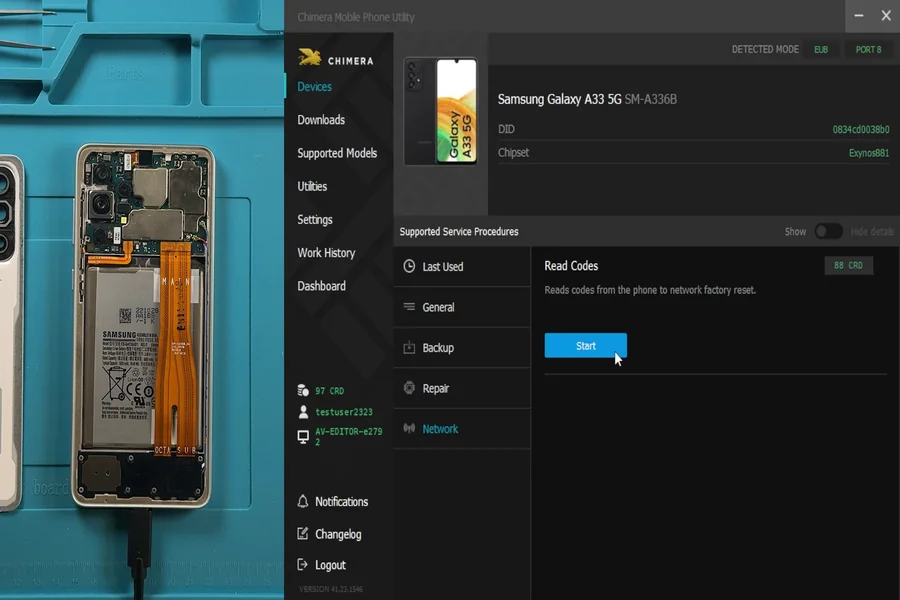
The Read Codes Online procedure supports several connection modes to ensure broad compatibility across Samsung devices. To explore exactly which devices are supported, professionals can consult the official list of supported models, which provides up-to-date compatibility information directly from Chimera’s database.
Each connection mode serves a specific purpose and makes the process more adaptable. ADB Mode allows technicians to retrieve information while the device is powered on with USB debugging enabled, eliminating the need for restarts.
Bootrom Mode extends support to Samsung devices equipped with MediaTek chipsets, creating an option for models that require a deeper low-level interface. EUB Mode is designed for Exynos devices running firmware with a security patch level earlier than April 2025, offering a straightforward way to read codes on older versions without additional complexity.
ADB Mode Advantages
ADB Mode is usually the most convenient method for technicians because it enables them to read codes while the device remains fully operational.
This reduces handling time and enables faster task transitions. When USB debugging is enabled, communication between the device and the tool is stable and direct, supporting a smooth workflow.
Bootrom and EUB Use Cases
Bootrom Mode is valuable for Samsung models built with MediaTek chipsets, giving technicians access to essential functions even when the device requires a low-level connection.
EUB Mode, on the other hand, remains an efficient solution for older Exynos devices. By supporting these alternative paths, Chimera ensures that technicians can still read codes even when the device does not meet the conditions for ADB Mode.
Key Benefits
One of the strongest advantages of the procedure is the speed and accuracy it brings to Samsung unlocking. Technicians can read codes without performing extra steps or relying on uncertain workarounds, which significantly reduces troubleshooting time.
Another major advantage is that this method uses original manufacturer unlock codes, ensuring a permanent, official result without the need for firmware modification. From a business perspective, it is highly cost-effective as there are no recurring fees, the system operates on a flexible pay-per-phone basis.
Unlike ADB mode, which requires rooting, the EUB and Bootrom methods eliminate the need for flashing or bypassing, making the entire process far more predictable. Everything takes place within the stable Chimera environment, allowing technicians to focus on delivering reliable results and maintaining high efficiency when handling multiple Samsung devices in succession.
Reading network unlock codes with ChimeraTool is a reliable solution because it retrieves the original manufacturer-issued unlock code, ensuring a clean and permanent unlock. Since the code comes directly from the device, there is no need for risky patches or unofficial methods. Chimera operates on a pay-per-phone model with fixed pricing, which eliminates uncertainty and hidden costs. This makes expenses predictable and easy to calculate in advance, whether unlocking a single device or handling volume work. As a result, ChimeraTool is especially attractive for professional workshops and resellers who need both technical reliability and clear cost control.
Time Savings for Professionals
The ability to read codes directly from the device dramatically shortens the unlocking process. Instead of juggling several tools or restarting devices, technicians complete the essential steps through one consistent interface. This efficiency is especially valuable in busy service centers where time directly affects profitability.
A Safer Unlocking Experience
By avoiding unnecessary risks, the feature provides a secure path to retrieving the data required for network and region unlocking. There is no flashing involved and no reliance on external utilities, which reduces the chances of error.
Summary
The Read Codes Online feature offers a fast, safe, and reliable way for technicians to read codes needed for Samsung network and region unlocking. With fewer risks, no flashing, and no external utilities required, ChimeraTool provides a professional-grade solution that supports both accuracy and productivity. For repair teams seeking a dependable workflow, this feature helps streamline operations and deliver confident, repeatable results.
